Production Scheduling Software for Contractors: How to Plan, Track, and Manage Shop Production
Discover how production scheduling software helps contractors and fabricators plan shop production, manage capacity, track materials and labor, and keep deliveries aligned with jobsite schedules.
 Sneha Kumari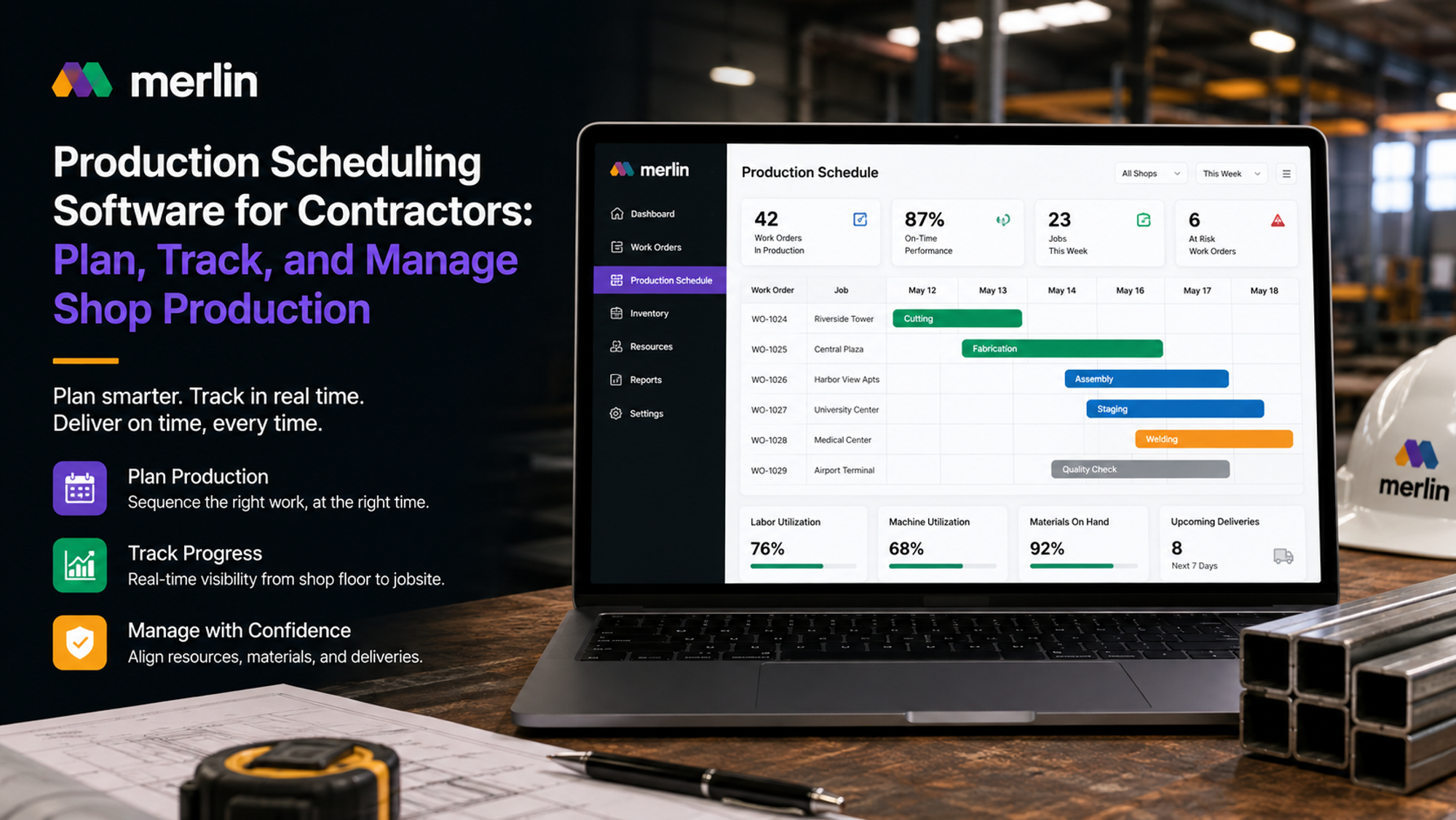
A contractor's first shop rarely fails because of bad equipment or a weak crew. It fails because nobody built a system to connect what the shop is producing to what the jobsite actually needs, and when. Materials pile up for jobs that are still weeks out while a crew on site waits on parts that should have shipped days ago. A whiteboard gets erased before anyone captures what was actually decided. A spreadsheet holds the plan right up until the moment reality diverges from it, which is usually within the first week.
Production scheduling software exists to close that gap. It gives contractors and fabricators one connected system for planning what gets built next, tracking what is actually happening on the shop floor, and keeping production aligned with confirmed delivery dates instead of guesswork. As more trades move work off the jobsite and into dedicated shops, warehouses, and self perform divisions, the difference between a shop that scales and one that stalls increasingly comes down to whether that system exists.
This guide breaks down what production scheduling software actually is, why contractors and fabricators are adopting it, the features that separate a genuine production scheduling system from a repurposed project management tool, how it stacks up against spreadsheets and traditional scheduling tools, and how it changes the day to day work of tracking and managing shop production.
What Is Production Scheduling Software and How Does It Work?
Production scheduling software is a system that plans, sequences, and tracks the work moving through a shop, warehouse, or fabrication line so that materials, labour, and machine time line up with the dates a job actually needs to be delivered. Instead of a foreman working from memory or a whiteboard, the software holds one live schedule that shows what should be produced next, what it needs to start, and when it has to ship.
At its core, a production scheduling system does three things. It takes incoming demand, whether that is a jobsite install date, a customer order, or a project milestone, and converts it into a queue of production work. It checks that queue against real capacity: available labour hours, machine time, and material on hand. Then it sequences the work so the shop is always building toward what is actually needed next, not just whatever is easiest to run.
For contractors and fabricators this usually means connecting three things that have historically lived in separate places: the confirmed delivery or install date, the shop floor queue, and the materials required to complete each work order. When those three pieces are tied together in one system, a production scheduling system stops being a static calendar and starts acting as the operational backbone of the shop, updating automatically as jobs move, materials arrive, or priorities shift.
Manufacturing scheduling software works on the same underlying logic that traditional manufacturers have used for decades: batching similar work, sequencing by priority, and building in buffer so a single delay does not cascade into a missed delivery. What is different for construction is the constraint on the other end. A factory schedules against its own throughput targets. A contractor's shop has to schedule against a jobsite calendar it does not fully control, which is exactly why generic manufacturing production scheduling tools often need to be adapted, or replaced entirely, for construction specific workflows.
Why Contractors and Fabricators Need Production Scheduling Software
Contractors need production scheduling software because the moment work moves off the jobsite and into a shop, the old way of managing a schedule stops working. Field crews adjust to whatever the site throws at them each morning. A shop cannot operate that way. Materials have to be ordered, cut, assembled, and staged days or weeks ahead of the install date, and every one of those steps has to land in the right sequence for the right job. Without a system built for that sequencing problem, contractors end up either producing work nobody needs yet or falling behind on work the jobsite is waiting on.
This shift is happening across the trades. More mechanical, electrical, and general contractors are opening dedicated production spaces: prefab shops building rack assemblies and conduit runs off site, warehouses that stage materials ahead of delivery, and self perform divisions that bring framing or interior work in house. Each of these moves gains a contractor labour efficiency and schedule control, but only if the production side is run with the same rigour as the project side. A shop without a scheduling system quickly becomes as chaotic as the jobsite it was meant to simplify.
Fabricators face a related but distinct pressure. Their production output usually feeds several jobsites at once, each with its own delivery window and its own consequences for a missed date. A contractor production software system built for this reality gives a fabricator one place to see every confirmed need date, rank jobs by real urgency rather than whoever called last, and hold enough buffer that a single material delay or machine issue does not turn into a missed install on site.
The underlying driver is growth. A contractor running one project at a time can manage production from memory. Add a second and third active job, a warehouse, and a growing prefab operation, and the coordination burden multiplies faster than headcount can absorb it. That is the point where a manufacturing scheduling system stops being optional and starts being the thing that determines whether growth improves margin or quietly erodes it.
Key Features to Look for in Production Scheduling Software
The right production scheduling system does more than hold a calendar. Before choosing a platform, contractors and fabricators should confirm it covers the full cycle from confirmed demand through to delivery, not just one piece of it.
- A shared, visible install or delivery calendar: The shop floor needs to see actual confirmed dates, filtered down to what matters for production, not a master project schedule buried in hundreds of line items.
- Priority based queuing, not first in first out: Jobs closer to their need date should always outrank jobs that arrived in the queue earlier but are not due for weeks. Without an explicit rule, shop leads default to whatever is easiest to run next.
- Capacity aware scheduling with built in buffer: A schedule that assumes every run goes perfectly will fail the first time a delivery is late or a machine goes down. Good production planning software accounts for that variance automatically rather than leaving it to chance.
- Materials visibility tied to work orders: Production scheduling only holds up if the materials behind each job are actually on hand. Systems that connect scheduling to real time inventory tracking and warehouse control prevent the common failure mode where a job is scheduled but the parts to build it are not actually available.
- A live connection back to the original estimate: The quantities, labour hours, and cost assumptions built during bidding should carry through as the baseline for the production schedule. Our look at how estimating data flows into production planning covers why losing that connection is one of the quietest ways contractors lose margin.
- Labour and cost tracking at the work order level: Hours and materials should be logged against specific tasks, not just totalled at the end of a week, so a contractor can see productivity and cost drift while there is still time to correct it.
- Mobile or shop floor access: A schedule that only lives on a manager's desktop does not help the crew running the line. Real production scheduling systems put the current queue in front of the people actually doing the work.
Not every tool that touches a calendar or a work order qualifies as genuine manufacturing scheduling software. A platform missing two or three of these capabilities usually means a spreadsheet or whiteboard survives alongside it anyway, which defeats much of the point of adopting a system in the first place.
Production Scheduling Software vs. Spreadsheets and Traditional Scheduling Tools
A spreadsheet can hold a schedule. What it cannot do is update itself when a delivery runs late, a crew logs hours against the wrong task, or a job moves up in priority because a jobsite date changed. Every one of those updates has to be made by hand, by someone who remembers to make it, which is exactly where spreadsheet based scheduling breaks down as a shop grows past two or three active jobs.
The comparison usually plays out along a few consistent lines:
- Update speed: A spreadsheet reflects whatever was last typed into it. A production scheduling system reflects what is actually happening on the floor, because hours, materials, and job status update the schedule automatically as work progresses.
- Visibility across teams: A spreadsheet lives on one person's laptop until someone remembers to share it. A shared system gives the shop floor, the office, and the field the same live view of what is coming next.
- Error rate: Manually re entering quantities, dates, and hours introduces mistakes that compound across a growing number of jobs. A connected system carries data forward automatically instead of re keying it at every handoff.
- Traceability: When something goes wrong, a spreadsheet rarely shows why. A proper production scheduling system keeps a record of what was scheduled, what actually happened, and where the plan and the reality diverged.
- Scalability: A spreadsheet that worked fine for one job at a time usually collapses once a contractor is running several projects, a warehouse, and a prefab shop at once. Purpose built construction ERP software for materials, labour, and cost is designed to scale with that complexity instead of breaking under it.
Traditional standalone scheduling tools sit somewhere between a spreadsheet and a full production scheduling system. They can sequence tasks and show a calendar, but most were built for general project management rather than the specific mechanics of a shop floor: work orders, batching, material consumption, and capacity by machine or crew. Adapting a generic scheduling tool to run a production environment usually means building workarounds for the gaps, which is functionally the same problem as running the shop on a spreadsheet, just with a nicer interface on top.
How Production Scheduling Software Helps Contractors Track and Manage Shop Production
Once a shop and a jobsite are running on the same connected schedule, tracking and managing production stops being a matter of guesswork and phone calls. The software gives a contractor three things at once: a plan, a real time record of progress against that plan, and an early signal when the two start to drift apart.
Planning improves first. A production scheduling system builds the shop's queue backward from confirmed delivery dates rather than forward from whatever is easiest to run next. Our detailed look at scheduling shop production around jobsite need dates walks through exactly what that queuing model looks like day to day, including how priority tiering and built in buffer keep a single delay from cascading into a missed install.
Tracking is where the day to day value shows up. As crews log hours and materials against specific work orders, the schedule updates itself, so a manager can see at a glance which jobs are on pace, which are falling behind, and which are ready to ship. That level of tracking depends on materials being staged and counted properly in the first place, which is exactly why so many contractors running production scheduling systems are also investing in dedicated warehouse space to control materials rather than ordering job by job.
Managing shop production well also means the schedule does not stop at the shop door. Delays or accelerations on the production side ripple into the jobsite, and jobsite changes ripple back into the shop. Contractors who run this connection well are the same ones building the operational habits that carry into how they coordinate trade partners and subcontractor schedules on the project side, because a shop that reliably hits its dates gives everyone downstream, from site superintendents to the developers who ultimately depend on the finished work, one less variable to manage.
The result of managing shop production this way is not just fewer missed dates. It is a shop that gets more predictable every quarter instead of hitting the same coordination problems at a larger scale. Throughput increases because production is planned rather than reactive. Margin improves because labour and material use are visible enough to manage instead of reconciled after the fact.
Frequently Asked Questions
What is the difference between production scheduling software and general project management software?
General project management software tracks tasks, documents, and timelines for a project as a whole. Production scheduling software is built specifically for the shop floor: sequencing work orders, tracking material consumption, and managing machine or crew capacity against confirmed delivery dates. Many contractors run both, with the production scheduling system feeding status back into the broader project schedule.
How much does production scheduling software cost for a growing contractor?
Pricing varies widely depending on shop size, number of users, and whether the system also covers materials and financial management. Most vendors price per seat or per module rather than publishing a flat rate, so contractors should expect a scoped quote based on production volume. The more useful comparison is against the cost of the errors, delays, and idle labour a disconnected schedule already produces.
Can production scheduling software integrate with existing accounting or ERP systems?
Most modern manufacturing scheduling software is designed to sync labour hours, material costs, and purchase orders with accounting platforms rather than operating as an isolated tool. Integration depth varies by vendor, so it is worth confirming during evaluation whether the connection is a genuine live sync or a manual export that still requires reconciliation.
Is production scheduling software worth it for a small fabrication shop?
Scale matters less than complexity. A shop running one job at a time can often manage with a whiteboard or a spreadsheet. Once a fabricator is juggling several jobs, shared crews, and multiple delivery dates at once, the coordination cost of manual scheduling tends to exceed the cost of a proper production scheduling system, even at a relatively small shop size.
How long does it take to implement a production scheduling system?
Most contractors see a working schedule within the first few weeks, though full adoption, including clean data on materials, work orders, and crew capacity, typically takes a full production cycle or two to settle in. Shops that start with clear work order processes and defined priority rules tend to reach a stable, reliable schedule faster than those trying to digitise an informal process all at once.